Time and attendance for teams on sites, shifts and the road.
Museco Connect is time and attendance software for businesses across the UK and Ireland. Staff clock in and out from their phone, a browser or a shared tablet, every punch records where it was made, and the office sees who is in on every site. Rotas, overtime, timesheets and the payroll file come from the same records.
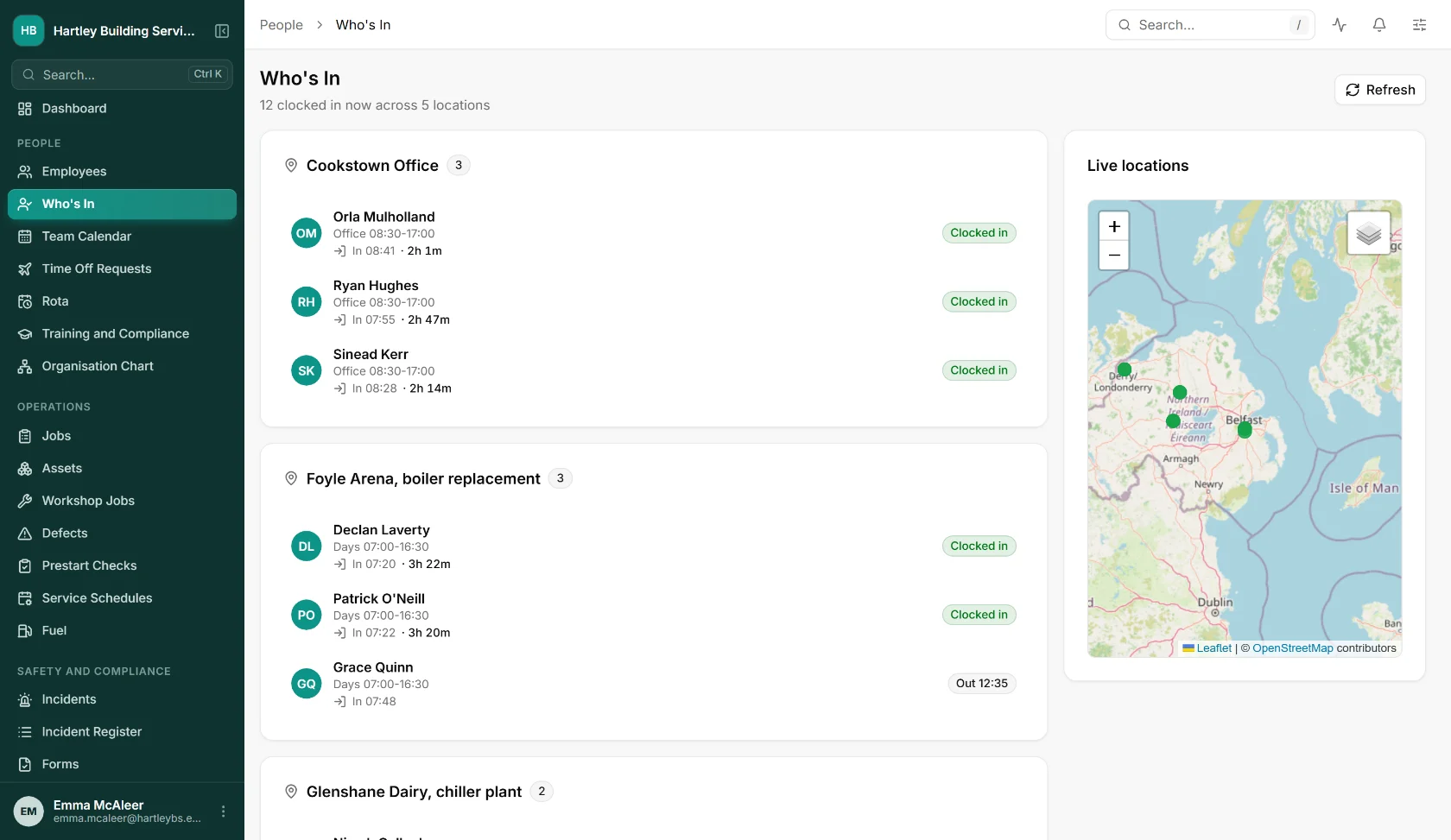
Time and attendance software, in short.
- What it is
- Time and attendance software: clock-in and breaks, rotas, overtime rules, timesheets and a payroll export, part of the Museco Connect HR system.
- Who it is for
- UK and Irish businesses with staff across sites, shifts and customer jobs: trades, construction, manufacturing, field services and logistics.
- How staff clock in
- The iOS or Android app, a web browser, or a shared tablet or browser kiosk where each person enters a PIN.
- Where it works
- Great Britain, Northern Ireland and the Republic of Ireland, with UK or Irish tax years for pay periods. Data is hosted on Microsoft Azure in Ireland.
- Pricing
- Priced per employee for the modules you use, quoted in writing. Employee records are free.
- Works with
- Your payroll, through a CSV file in a general layout or as a Sage 50 journal.
The problems it was built to fix.
Who actually turned up?
The first hour of the day goes on phone calls to find out who is on which site. Who’s In answers it on one screen.
Timesheets written from memory
Hours written up at the end of the week, then typed into payroll by someone else. Every step is a chance for the numbers to disagree.
Overtime worked out by hand
Weekend rates, night bands, call-outs and daily thresholds applied by whoever does the wages, a little differently each week.
Punches nobody can check
A start time with no location is just a number someone entered. Every Connect punch records GPS, and can be checked against the site.
From the first punch to the payroll file.
Clock-in, rotas, overtime and payroll share the same people and the same records as the rest of Connect, so hours are never keyed in twice.
Clock-in & Attendance
Clock in and out, and start and end breaks, from the app, the web or a shared kiosk, against a depot, a customer job or offsite work. Every punch records GPS and can be checked against a site geofence, an approved Wi-Fi network or an IP address, either flagged for review or refused.
What else is in it
- Offline clock-in on mobile, sent in order when the signal returns (where you switch it on)
- Who’s In: everyone clocked in now, by location, on a map
- Missed and late clock-ins picked up, with reminders
- Optional automatic clock-out
- Rounding and grace periods, off by default, with the original punch always kept
- A change history for every punch
Rota & Shifts
Build rotas from working patterns automatically, publish open shifts, and check every rota against 16 working time rules before it goes out. Labour cost against budget and a cover forecast sit beside it.
What else is in it
- Rules include daily rest, the weekly hours cap, under-18s, required qualifications and clashes with leave
- Timesheets to approve, dispute, re-approve and complete for missing days
- Timesheet export as CSV
Overtime and pay rules
Set overtime per shift type: daily and weekly thresholds, multipliers, weekend and bank holiday rates, time bands such as nights, a minimum for call-outs, and split shifts.
Payroll Connect
Close each pay period with approved pay elements, starters, leavers and bank detail changes, and download the payroll file as a CSV, in a general layout or as a Sage 50 journal. Pay periods follow UK or Irish tax years. Tax is still calculated by your payroll software or bureau.
Leave and HR records
Approved leave, sickness and training days sit on the same calendar as the rota, and every punch belongs to a full employee record.
HR softwareThis is the actual software.
Screens from the running system, with sample data for an invented company.
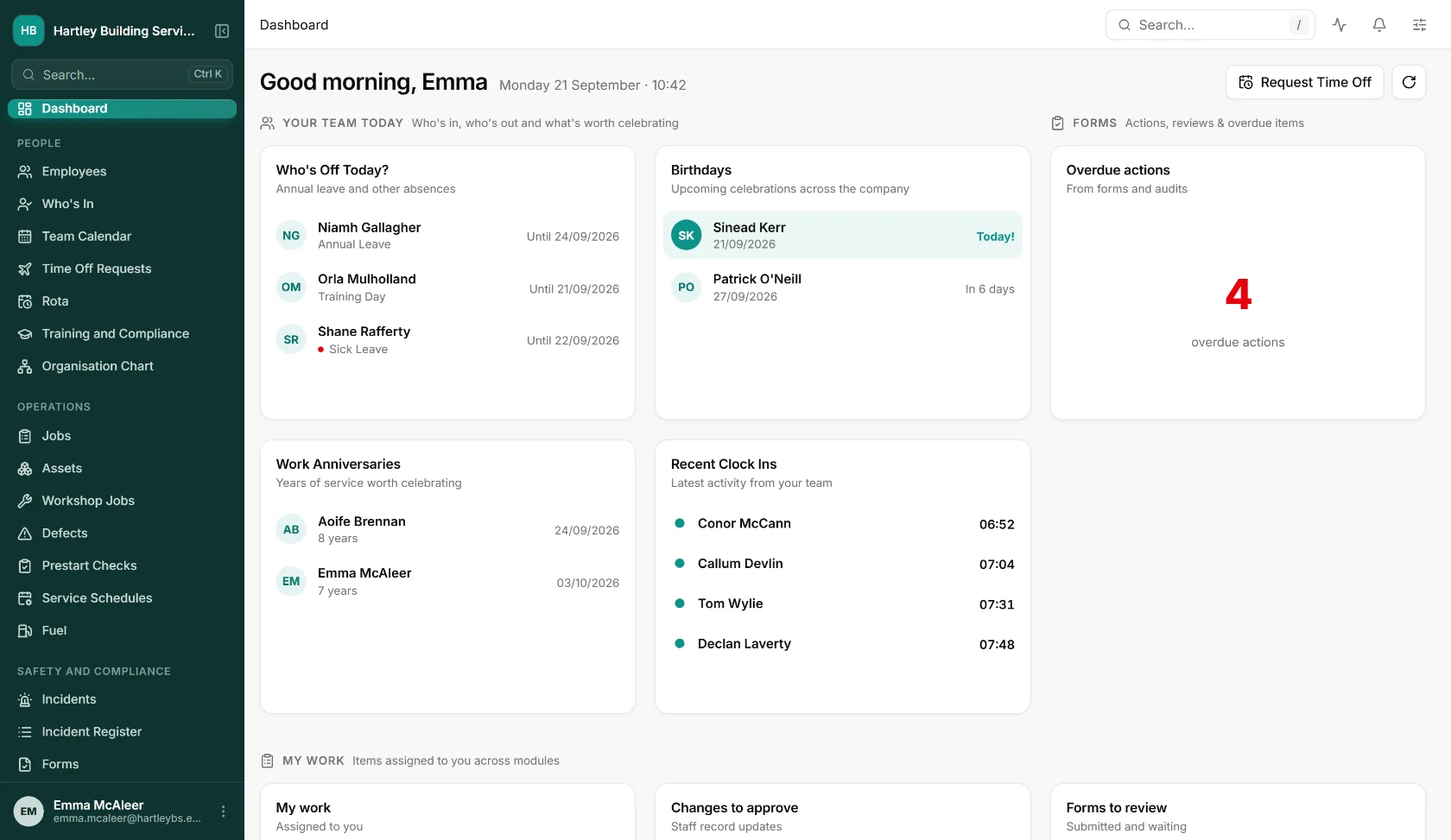
The latest clock-ins, first thing
Recent clock-ins and who is off today sit on the dashboard a manager opens first.
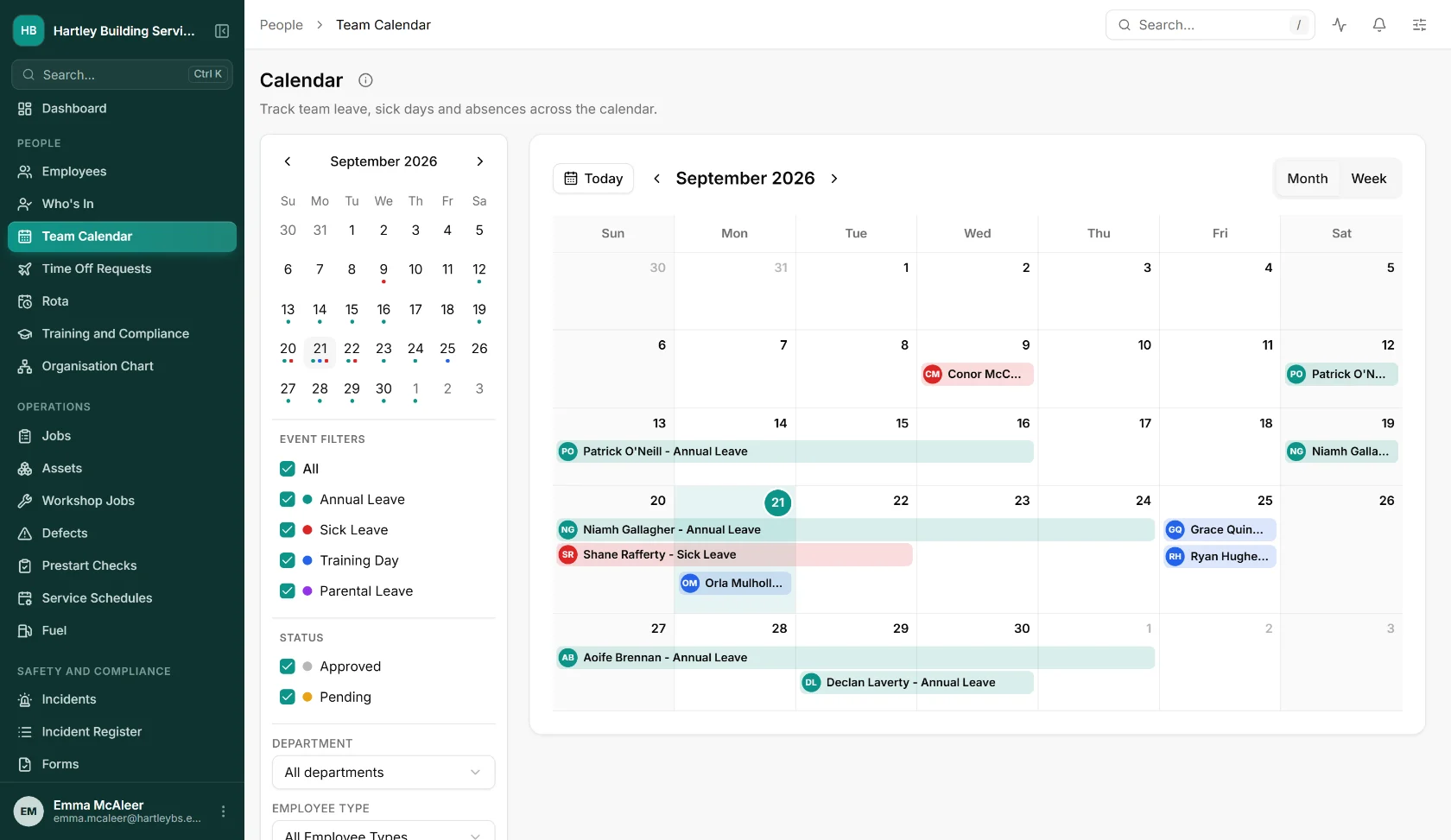
Absence on the same calendar
Annual leave, sickness and training days by person, so the rota is built around who is actually available.
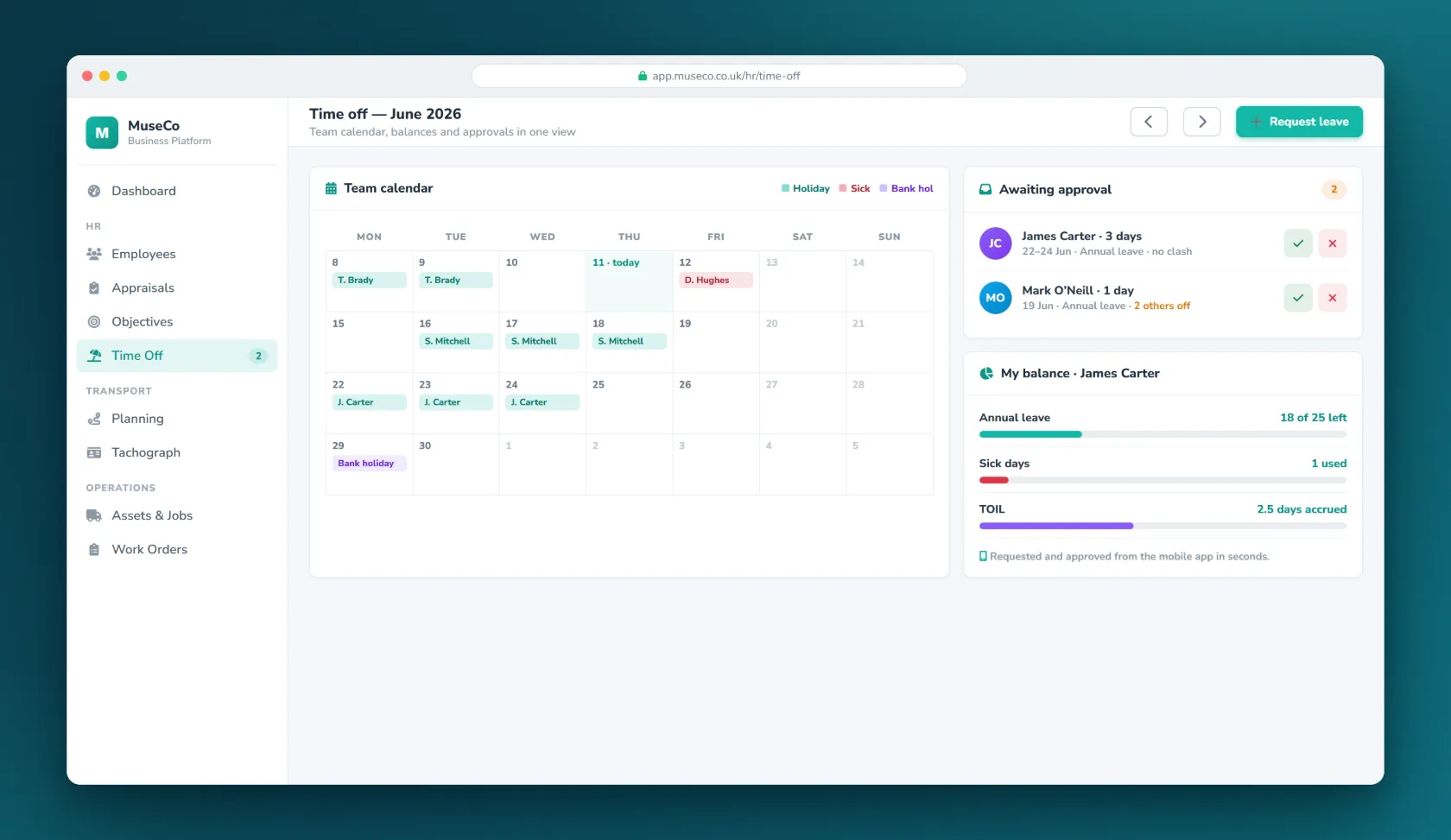
Leave requested in the app
Staff request time off from their phone and managers approve it there too.
Asked before you ask.
What is time and attendance software?
It records when people start and finish work and turns those records into timesheets, overtime and a payroll file. In Museco Connect it sits in the same system as rotas, leave and employee records, so hours, holidays and pay rules are never keyed in twice.
How do staff clock in?
From the Connect app on an iOS or Android phone, from a web browser, or at a shared tablet or browser kiosk where each person enters a PIN. Breaks are started and ended the same way, and each clock-in is against a depot, a customer job or offsite work.
How do you stop people clocking in when they are not on site?
Every punch records GPS. You can also check it against a geofence around the site, an approved Wi-Fi network or an IP address. Each check can either flag the punch for a manager to review or refuse the clock-in outright.
What if there is no mobile signal on site?
Where you switch it on, the app accepts clock-ins offline and sends them in the right order when it reconnects.
Does it handle overtime, nights and weekend rates?
Yes. Overtime is set per shift type, with daily and weekly thresholds, multipliers, weekend and bank holiday rates, time bands such as nights, a minimum for call-outs and split shifts. Rounding and grace periods are available too, off by default, and the original punch time is always kept.
Does it check rotas against working time rules?
Yes. Before a rota goes out it is checked against 16 rules, including daily rest, the weekly hours cap, rules for under-18s, required qualifications and clashes with approved leave.
Does it work with our payroll?
Payroll Connect produces a payroll file for each pay period as a CSV, in a general layout or as a Sage 50 journal, with approved hours, pay elements, starters, leavers and bank detail changes. Pay periods follow UK or Irish tax years. It does not calculate tax, so your payroll software or bureau carries on doing that.
Can managers see who is in right now?
Yes. Who’s In lists everyone clocked in, grouped by location, with their start time and a live map. Missed and late clock-ins are picked up automatically with reminders, and you can choose to clock people out automatically if they forget.
How much does it cost?
You pay for the modules you use, priced per employee, and employee records themselves are free. We would rather scope it with you than publish a figure that is wrong for your situation, so ask and we will give you a written quote.
The rest of Connect.
Let’s talk about
your business.
A free, no-obligation conversation about the problem you’re trying to solve. Tell us a little about it and we’ll reply within one working day.
Both are hidden from the bots that harvest them for spam until you click.