HR software for teams that are not all at a desk.
Museco Connect is HR software for businesses across the UK and Ireland. It keeps every employee’s record, leave, training, documents and reviews in one system, and gives staff an app to book leave, check their rota and sign documents from their phone. It is built for teams spread across sites, shifts and vans as well as offices.
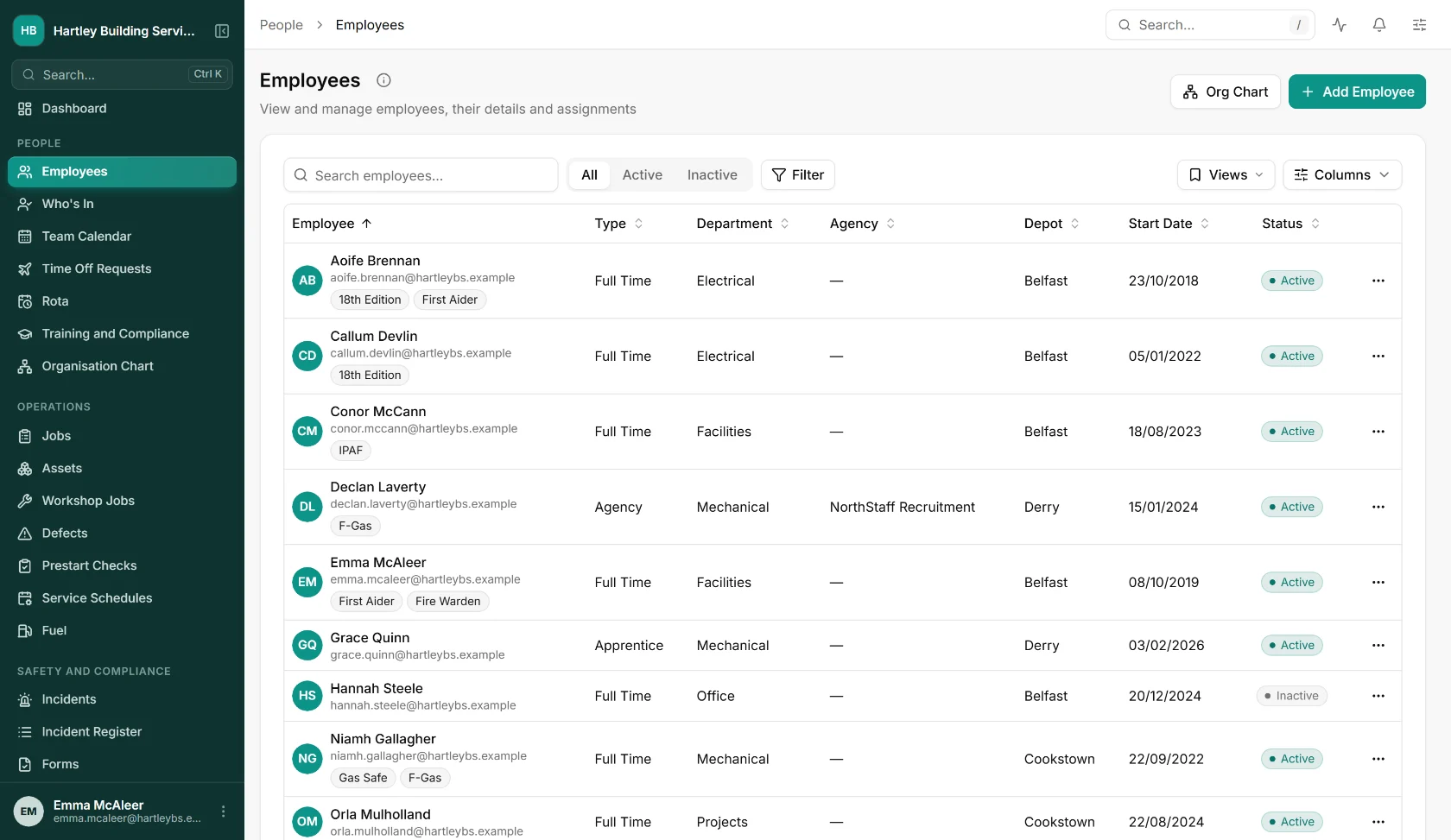
HR software, in short.
- What it is
- HR software: employee records, leave and absence, training and compliance, performance, e-signatures and recruitment in one system, with time and attendance alongside.
- Who it is for
- UK and Irish businesses whose staff work on sites, on shifts or on the road as well as in an office.
- Where it works
- Great Britain, Northern Ireland and the Republic of Ireland. Payroll periods follow UK or Irish tax years, and your data is hosted on Microsoft Azure in Ireland.
- How staff use it
- A web app for the office, and native apps for iOS and Android.
- Pricing
- Employee records are free for any number of people. You pay for the modules you switch on, and we quote in writing.
- Works with
- Your payroll, through a CSV file (a general layout or a Sage 50 journal). DocuSeal for e-signatures. Spreadsheet import for existing records.
The problems it was built to fix.
Records in five places
Contracts in a drawer, training in a spreadsheet, leave on a wall chart. Finding out who is qualified, or how much holiday someone has left, takes a morning.
Certificates that lapse unnoticed
Right to work documents, licences and tickets expire, and nobody notices until an audit or an incident. Connect reminds you before the date, not after.
Leave booked by text message
Requests arrive by text, email and word of mouth, balances are worked out by hand, and two people end up booking the same week.
Staff who never sit at a desk
Most HR systems assume everyone has a laptop. If your team is on site, on shift or on the road, the system has to work on their phone.
Everything HR needs, in one system.
Switch on the modules you need and add the others when you are ready. They share one set of employee records, so nothing is keyed in twice.
HR Core
One record per person: contact and bank details, identity and right to work documents with expiry reminders, medical declarations, pay history, benefits and an organisation chart.
What else is in it
- Disciplinaries with appeals
- Promotions and pay history
- Onboarding and offboarding checklists, probation and exit interviews
- Company equipment issued and returned
- Bulk import of employees, leave balances, training and licences
Leave & Holidays
A policy for each leave type, and requests staff make in the app and managers approve on their phone. Balances update as each request is approved.
What else is in it
- Pro rata allowances, carry-over limits and expiry
- Allowances that build up from hours worked
- Extra days for length of service
- Bank holidays inside or on top of the allowance
- Half days and blackout periods
- A team calendar of leave, sickness and training days
- Workflow rules, such as a return to work form after sickness
Employee Portal
Self-service on the web and in the app: staff see their profile, leave, rota, open shifts and documents. Changes to personal or bank details go to a manager to approve.
Training & Audits
Training and certificates assigned to each person, with expiry alerts and a training matrix showing who is covered and who is not.
What else is in it
- Read and confirm content, with questions
- Certificates uploaded from the phone
- Gaps counted per requirement
Performance
Appraisals with self, manager and HR sign-off, one-to-ones, objectives with key results and check-ins, and recognition.
E-Signatures
Send contracts and policies for signature, with an email or SMS code check and a record of who signed and when. Policy acknowledgements are tracked the same way.
Recruitment
Job requisitions with approval, a careers page you can embed on your own website (marked up so Google can list the jobs), applications, interviews and offers. A successful applicant becomes an employee in one step.
Clock-in & Attendance
Clock in from the app, the web or a shared tablet, with location checks, rotas, overtime rules, timesheets and a payroll file.
Time and attendance softwareThis is the actual software.
Screens from the running system, with sample data for an invented company.
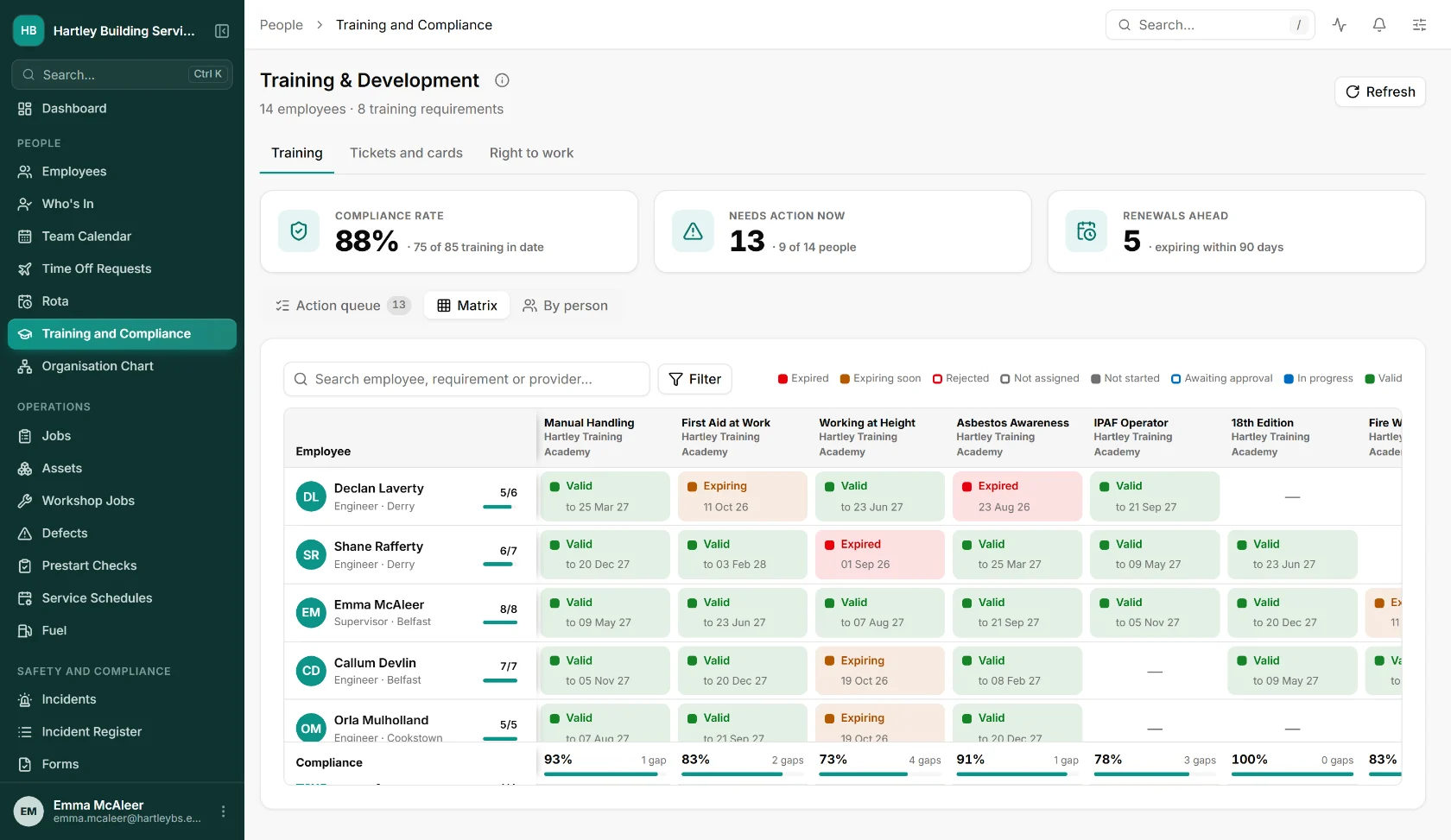
Who is trained, and who is not
Every person against every training requirement, coloured by valid, expiring and expired, with the gaps counted per course.
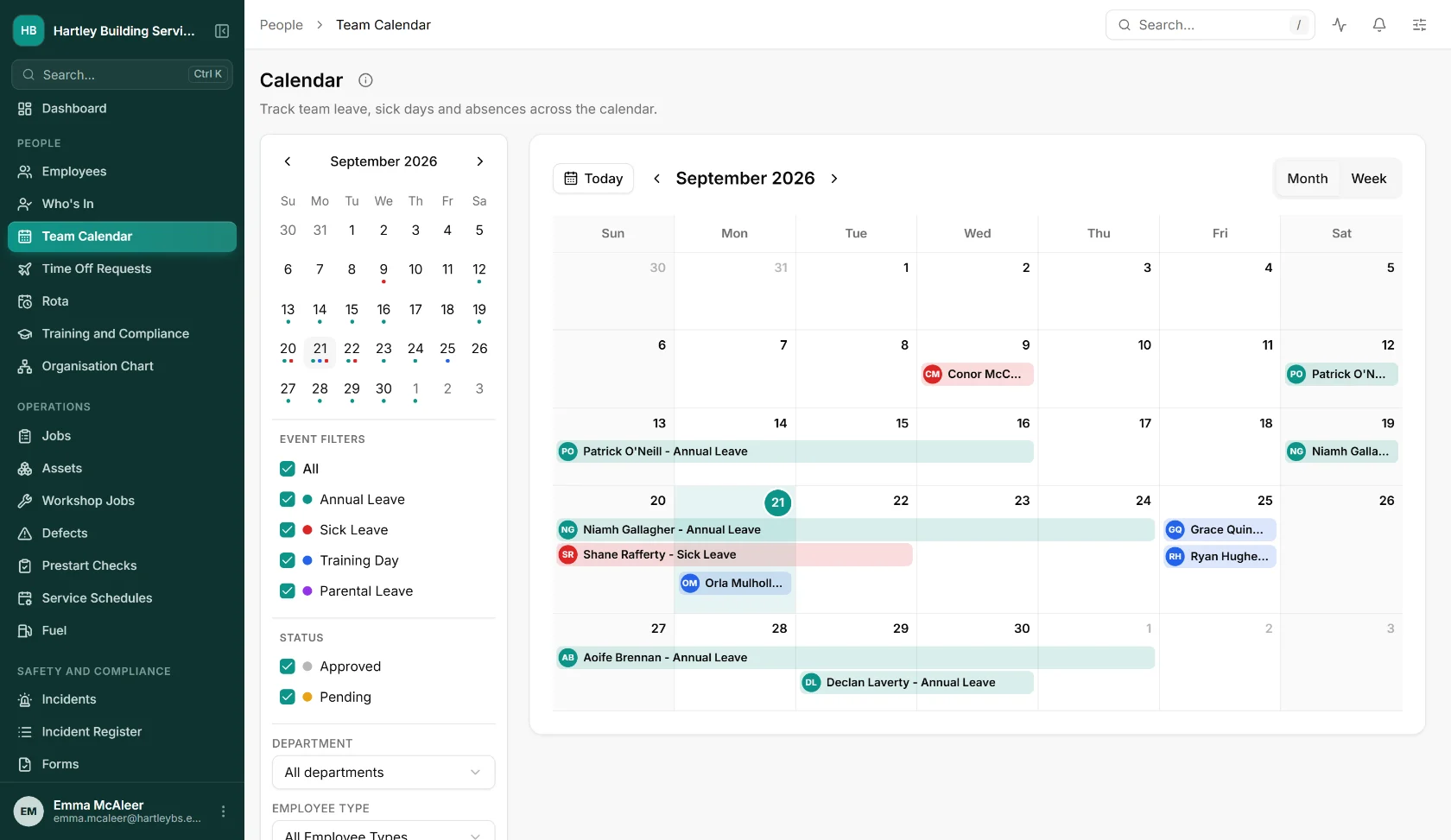
Leave, sickness and training on one calendar
Annual leave, sick leave, training days and parental leave across the team, filtered by department, with approved and pending requests side by side.
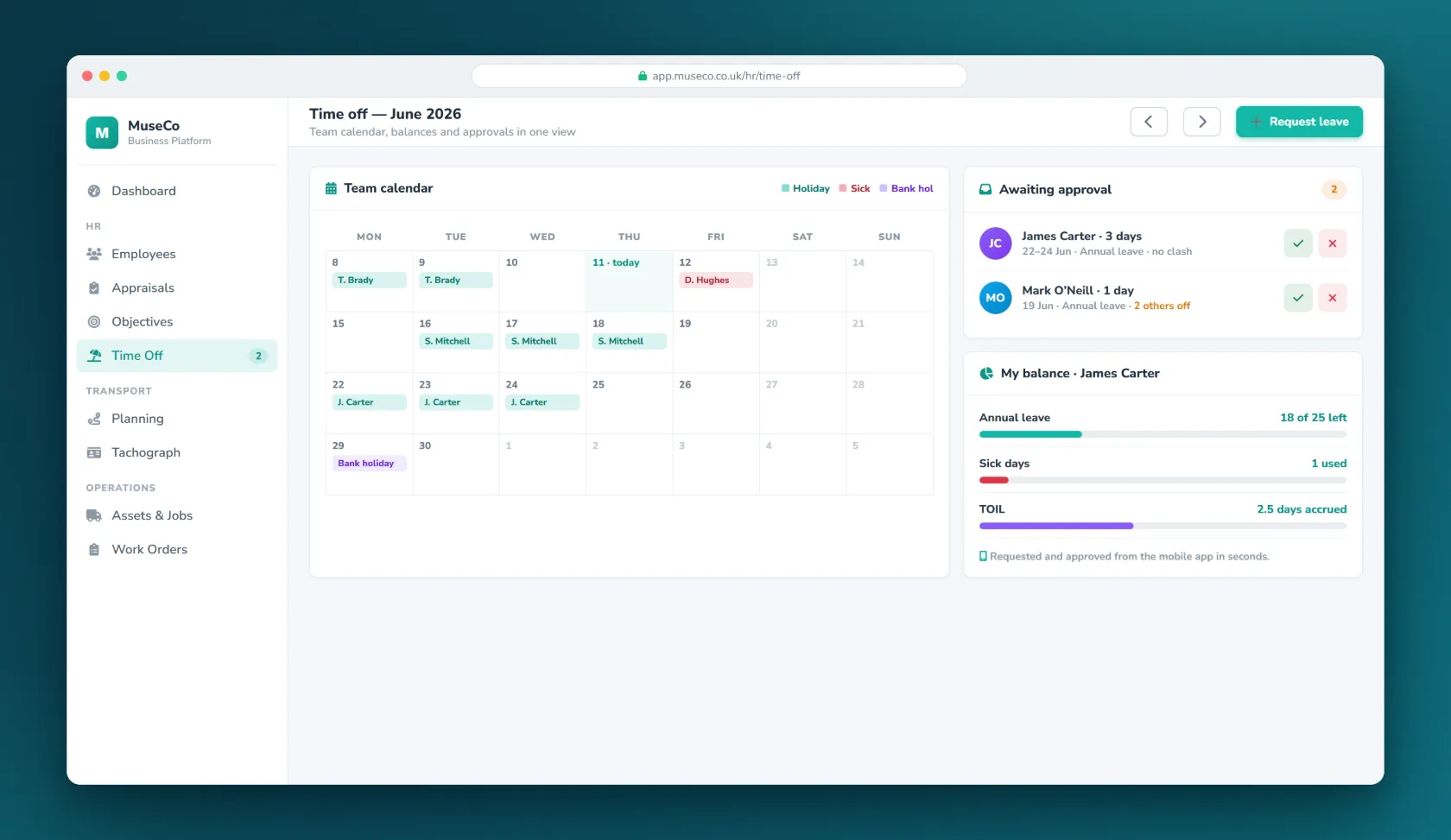
Leave, requested and approved
Staff request time off in the app, managers approve it, and the balance updates itself.
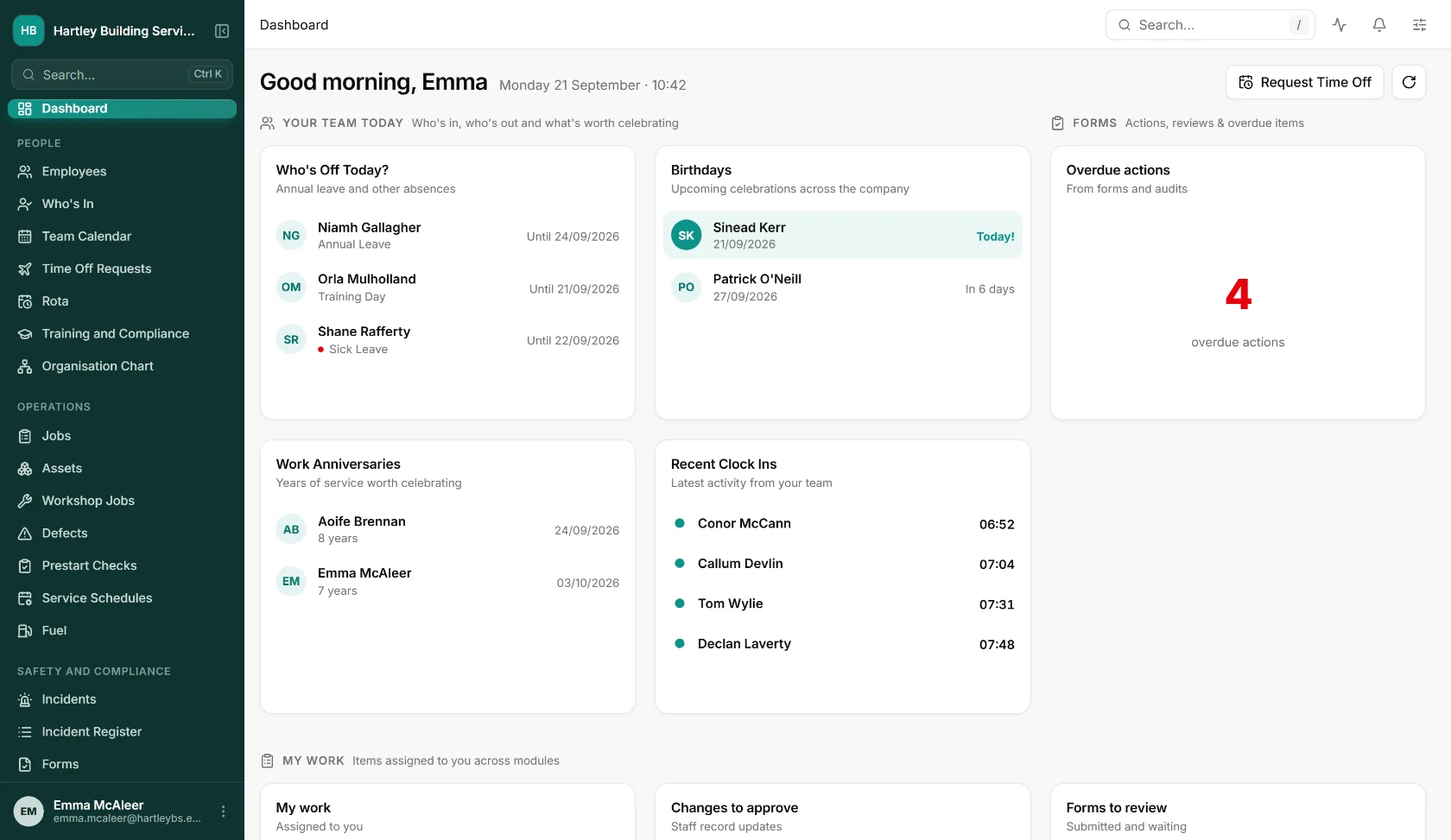
Your team today
Who is off and why, the latest clock-ins, birthdays, work anniversaries and overdue actions, on the dashboard a manager opens first.
Asked before you ask.
What is Museco Connect?
Museco Connect is HR software built and run by Museco, a software company in Mid-Ulster, Northern Ireland. It holds employee records, leave, training, documents, performance reviews and recruitment in one system, with a web app for the office and an iOS and Android app for staff. The same platform also covers time and attendance, jobs, assets and invoicing.
Is it suitable for a small business?
Yes. Employee records are free for any number of people, and you switch on only the modules you need, so you can start with leave or training and add the rest later. The same system grows with you across several depots and departments.
Does it work for businesses in Northern Ireland and the Republic of Ireland?
Yes. Connect is built in Northern Ireland and sold across the UK and Ireland. Payroll periods follow UK or Irish tax years, and leave policies let you count bank holidays inside or on top of each allowance.
Can staff use it on their phones?
Yes. In the iOS and Android app staff check their rota and open shifts, request leave, read their documents, complete training and upload certificates. Changes they make to personal or bank details go to a manager to approve before they are saved.
How does it handle holiday entitlement?
You set a policy for each leave type: pro rata for part-time staff and new starters, carry-over limits and when they expire, extra days for length of service, half days, blackout dates, and whether bank holidays sit inside or on top of the allowance. Allowances can also build up from hours worked. Balances update as each request is approved.
Does Connect run payroll?
No. Connect holds the hours, leave and pay elements your payroll needs, and Payroll Connect produces a payroll file for each pay period as a CSV, in a general layout or as a Sage 50 journal, including starters, leavers and bank detail changes. Your payroll software or bureau still calculates tax.
Can we move our existing staff records across?
Yes. Employees, leave balances, training records and licences can be imported in bulk from a spreadsheet, so you do not start from a blank system.
Where is our data held?
On Microsoft Azure in the North Europe region, in Ireland, encrypted in transit and at rest, backed up, and handled under UK and EU GDPR.
What happens to our data if we leave?
It is yours. If you decide to leave, we give you a full extract of your records in a format another system can read.
How much does it cost?
Employee records are free for any number of people. You pay for the modules you switch on, such as leave, training or performance, priced by the number of people who use them. We would rather scope it with you than publish a figure that is wrong for your situation, so ask and we will give you a written quote.
The rest of Connect.
Let’s talk about
your business.
A free, no-obligation conversation about the problem you’re trying to solve. Tell us a little about it and we’ll reply within one working day.
Both are hidden from the bots that harvest them for spam until you click.